
HERE WeGo: Maps & Navigation
HERE Europe B.V.Maps & Navigation
3.39.13K Reviews
- Version
- 4.20.110
- Installs
- 10.00M
- Age Rating
- Everyone
Screenshots

Our Review of HERE WeGo: Maps & Navigation
 Analysis by Appyee
I have always judged navigation apps by what happens when I am already late, carrying a bag, and standing somewhere unfamiliar. In those moments, a map needs to feel clear rather than clever, and a route needs to remain useful when the journey becomes more complicated than a simple drive across town. HERE WeGo is a free Maps & Navigation app from HERE Europe B.V. that aims to cover those everyday situations on both Android and iOS.
My impression is that it is best understood as a practical travel companion rather than a flashy map showcase. It gives me a familiar way to plan movement, check directions, and think through a trip before leaving. The store summary, “Enjoy the journey,” is brief, but it matches the app’s general purpose: reduce the uncertainty between where I am and where I want to go.
It is also a widely used product, with more than ten million installs and an average score of 3.3 from roughly half a million ratings. That combination tells me two things at once. Many people find a reason to keep it around, but the experience is not universally smooth. I would not install it expecting perfection; I would install it because having another established navigation option can be genuinely useful.
How HERE WeGo feels during ordinary navigation
I find HERE WeGo most useful when I treat it as a steady reference rather than a substitute for paying attention. This section looks at the small choices that make ordinary trips feel more manageable, from checking a destination before setting off to deciding when not to interact with the screen. The next part turns to what I would verify on my own phone before relying on it for a more demanding journey.
Speed expectations before and during a trip
When I open a navigation app, I want the first useful action to be obvious. HERE WeGo generally makes sense as a starting point for someone who wants to enter a destination, inspect the proposed journey, and then decide whether to continue. The interface is more valuable when I approach it as a planning tool instead of tapping around without a clear destination.
Perceived speed is not only about how quickly a screen appears. It is also about how quickly I can understand what the app is asking me to do. A clean route-planning habit helps: search for the destination first, check the travel mode and route details, then begin navigation only after confirming that the result matches my actual plan. That small pause prevents the common mistake of starting guidance for the wrong place or overlooking a less convenient route.
On a recent-style everyday journey, such as leaving home for an unfamiliar shopping area, I would use the app in stages. First I would check the destination while still connected and calm. Then I would look at the route rather than relying only on the spoken or visual guidance. Finally, I would keep the phone accessible but not constantly stare at it. This workflow makes the app feel faster because I am not forcing it to answer every question while I am already moving.
There is a trade-off here. A navigation app can appear slow when the real problem is a weak connection, a crowded phone, or a destination search that is too vague. HERE WeGo should not be judged only by the first few seconds after launch. The quality of the place name I enter and the preparation I do beforehand have a large effect on how quickly I reach a useful result.
What happens when the journey becomes demanding
The most revealing moments are the heavy-use ones: switching between route planning and other phone tasks, changing destinations midway, or trying to understand several turns in a busy area. This is where I prefer a navigation app that supports deliberate checking instead of encouraging frantic interaction. HERE WeGo works best when I let it handle one navigation decision at a time.
For a long day involving several stops, I would not treat the app as a complete travel diary. I would use it to verify each important leg, save myself from repeatedly guessing directions, and review the next destination before leaving the current one. That approach is less glamorous than planning everything in one burst, but it reduces the chance of carrying an outdated assumption through the entire day.
A useful, less obvious habit is to inspect the route before starting rather than trusting the first result automatically. The shortest-looking option may not be the easiest one for my actual circumstances. A route that seems attractive on a map can be awkward if I am walking with luggage, meeting someone at a particular entrance, or trying to avoid unnecessary changes. The app is more helpful when I use its map as a decision aid, not as a command that removes my own judgement.
Heavy use can also expose the limits of any phone-based map. Keeping the screen active, changing plans, and repeatedly checking directions naturally demands more from the device than a quick destination lookup. I would prepare the phone before a demanding trip: charge it, close distractions I do not need, and avoid beginning with a nearly full storage situation or an overloaded background workload. Those are sensible precautions, not promises that the app will behave identically on every device.
Reliability when plans change
Reliability, to me, means more than producing a route once. It means helping me recover when I miss a turn, change my mind, or discover that the original destination was not quite right. HERE WeGo is most reassuring when I use it with a recovery plan instead of assuming that the first route will survive the entire journey unchanged.
If I make a wrong turn, my first response would be to keep moving safely and allow the route to catch up rather than repeatedly touching the phone. If I decide to stop somewhere else, I would pause in a safe place before editing the destination. This matters because navigation becomes less reliable from a human perspective when I make rushed changes while walking through traffic or driving.
Another practical recovery technique is to remember the destination in ordinary terms, not only as a pin on the screen. If the app needs attention, I still want to know the neighborhood, street, or nearby landmark I was aiming for. HERE WeGo can support my orientation, but I should not surrender all awareness of the surroundings to any navigation service.
The app’s rating suggests that reliability may feel uneven across users and situations. I would therefore keep a backup habit for important journeys: note the key address, check the broader route before leaving, and avoid treating one app as the only source of truth. This is especially sensible when arriving somewhere on time matters, when the trip includes multiple transfers, or when I will be in an unfamiliar area with limited opportunity to stop and troubleshoot.
Device constraints and everyday comfort
HERE WeGo supports devices running Android 9 or later, which makes the minimum requirement fairly approachable for people who are not using the newest phone. Still, an operating-system requirement is only the starting point. The practical experience also depends on the phone’s age, available memory, battery condition, screen brightness, and the amount of work happening in the background.
On an older phone, I would be realistic about what “smooth” means. A map can remain useful even if transitions are not instant, but delays become more frustrating when I am standing at a junction and need a decision immediately. I would test the app at home before depending on it during a time-sensitive journey. That simple trial can reveal whether my particular device handles route searches and active guidance comfortably.
Battery use deserves attention because navigation is an unusually demanding phone activity. Screen time, location work, and mobile connectivity can all make a trip harder on a battery than ordinary reading or messaging. I would carry a power bank for a full day away from a charger, particularly if the phone is already older. That is not a criticism unique to HERE WeGo; it is a realistic constraint of using a phone as a travel instrument.
Visibility is another overlooked issue. A bright screen can be helpful outdoors but uncomfortable in low light, while a dim screen can make a map difficult to read. I prefer to set the display before moving and rely on short checks rather than holding the phone up continuously. The app is more useful when it supports safe attention, not when it becomes a reason to ignore the street around me.
Where it fits beside familiar alternatives
Most people comparing HERE WeGo will also think about the navigation app already installed on their phone. The usual alternative may feel more convenient simply because it is familiar, already connected to a person’s routines, or the first result they reach for. I would not switch solely because another app has a different visual style. The reason to try HERE WeGo is to see whether its planning approach and map experience suit the way I travel.
Using a second navigation app can be useful when the first one gives a route I dislike or when I want an independent view before committing to a journey. I would not run several apps continuously during the same trip, though. That can create distraction, duplicate battery demand, and conflicting instructions. A better comparison is to plan the same journey in each app before leaving, then choose one clear source for active guidance.
HERE WeGo is a stronger candidate for someone who wants a dedicated maps option rather than a broader ecosystem of services. It may be less compelling for a person who values having every travel task tied closely to one familiar account and workflow. The right choice depends less on the name of the app and more on whether I prefer a focused navigation tool or the convenience of an established all-purpose platform.
I would also avoid choosing based only on the average rating. A 3.3 average reflects a large range of experiences, but it does not tell me exactly how the app will behave on my phone, in my city, or during my usual journeys. The useful test is personal: search for places I know, inspect routes I have taken before, and try a short trip before making it part of an important routine.
Small habits that make the app more dependable
My first recommendation is to prepare important destinations while I still have time to think. I would check spelling, confirm that the selected place is the intended one, and look at the route before starting. This is particularly valuable for businesses with similar names or destinations located in large complexes where the map point may not match the entrance I expect.
My second recommendation is to separate planning from active navigation. I would make route decisions while stationary, then use the guidance mode with minimal interaction once moving. This reduces both distraction and the temptation to keep changing the plan because of a minor inconvenience.
My third recommendation is to build a recovery routine. I would keep the full address available in my notes for a critical appointment, remember a nearby landmark, and carry enough battery for the return journey. If the route changes unexpectedly, those details give me options instead of leaving me dependent on a single screen.
A fourth useful insight is to judge the app across different conditions rather than one perfect test. Try it at home on Wi-Fi, during a short local trip, and on a longer journey where the phone remains active. That comparison gives a more honest sense of perceived speed, stability, and comfort than opening it once and deciding immediately.
Who should use it and who should skip it
I think HERE WeGo is a sensible choice for people who want a free navigation app to keep available for ordinary driving, walking, or travel planning. It is especially worth considering if I like checking a route before departure, want an alternative to the map tool I normally use, or prefer to keep a separate navigation option ready for unfamiliar journeys.
It is also appropriate for cautious planners. I can use it to understand the shape of a trip before I leave, identify where decisions will matter, and avoid relying entirely on last-second instructions. That style makes the app feel more stable because I am using it as part of a broader travel routine.
I would skip it, or at least test it carefully first, if I need absolute confidence without any preparation. Someone with an older phone, a weak battery, or a habit of changing destinations constantly may find navigation more frustrating than expected. Likewise, a person who already feels completely comfortable with another map app may gain little from switching unless HERE WeGo solves a specific problem.
People who need highly specialized navigation should also be selective. A general Maps & Navigation app is not automatically the best tool for every professional route, accessibility requirement, remote journey, or complex travel plan. In those cases, I would compare it with an app designed around the exact need rather than assuming a familiar map interface is enough.
My performance verdict after using it as a travel tool
My overall view is measured but positive. HERE WeGo is not an app I would describe as flawless, and its 3.3 average rating makes me cautious about promising a universally polished experience. At the same time, its broad install base, free price, and straightforward purpose make it easy to justify trying, especially when I want a second navigation option.
In terms of perceived speed, it rewards preparation more than frantic interaction. In heavy-use moments, it is more comfortable when I handle one route decision at a time. For reliability, I trust it more when I keep basic awareness of the destination and maintain a backup plan for important trips. On device constraints, I would pay close attention to battery health, screen comfort, and how my own phone performs during a short test journey.
The app is rated for Everyone and currently sits at version 4.20.110, while its long availability since October 9, 2014 gives it the feel of an established navigation product rather than a brief experiment. Those details do not remove the need for personal testing, but they help explain why it remains worth considering.
My recommendation is to install HERE WeGo as a practical backup or everyday map, then earn your confidence through a few low-pressure trips. If it feels responsive on your device and its route presentation matches the way you travel, it can become a useful companion. If your priority is a completely effortless, ecosystem-heavy experience or specialized navigation, your usual alternative may still be the better fit.
Verdict
Strengths of HERE WeGo: Maps & Navigation
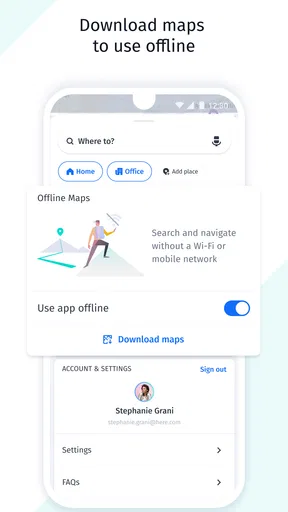
- Offline maps help you navigate without mobile data or a reliable signal.
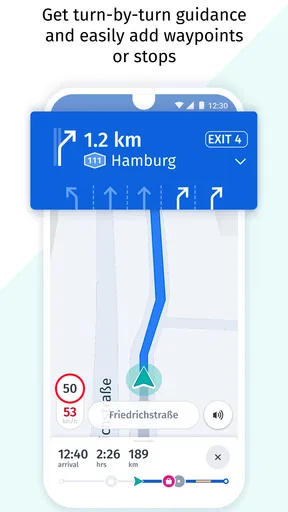
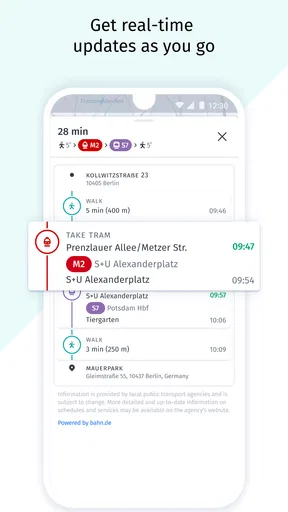
- Clear turn-by-turn directions support driving, walking, cycling, and public transport.
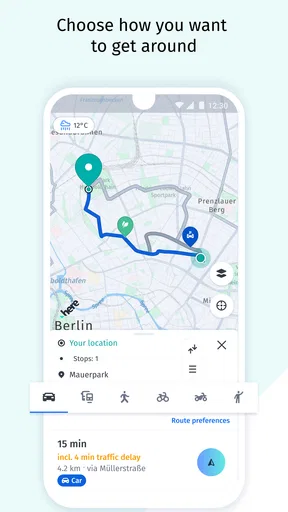
- Route planning compares different travel modes in one convenient place.
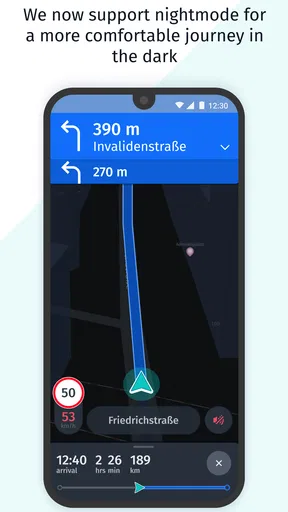
- Speed limit alerts can help drivers stay aware on supported roads.
- Saved places and collections make frequent destinations easy to access.
Limitations of HERE WeGo: Maps & Navigation
- Offline map downloads can require substantial storage space on your device.
- Coverage and transit details vary considerably between countries and cities.
- Some advanced traffic information depends on an active internet connection.
- The interface may feel busy when many route and map options are displayed.
- Map updates are not always available at the same time in every region.
Similar Picks in This Category
View All
Uber - Request a ride
Uber Technologies, Inc.4.7


inDrive. Rides with fair fares
® SUOL INNOVATIONS LTD4.8

Yandex Go: Taxi Food Delivery
Mikromobilnost LLC Belgrade4.8

Bolt: Request a Ride
Bolt Technology4.8

Rapido: Bike-Taxi, Auto & Cabs
Rapido Bike Taxi4.8
Frequently Asked Questions
What is HERE WeGo: Maps & Navigation used for?
HERE WeGo is a navigation and mapping app designed for driving, walking, cycling, and public transportation. After testing its main features, I found it useful for planning routes, checking estimated travel times, viewing nearby places, and receiving turn-by-turn directions. It also provides traffic information in supported areas, making it a practical alternative to other popular map applications.
Can HERE WeGo be used without an internet connection?
Yes, HERE WeGo supports offline navigation when you download maps for selected countries or regions in advance. This is particularly helpful when traveling abroad, driving through areas with weak mobile coverage, or avoiding roaming charges. However, offline maps may not include every live feature, such as current traffic conditions, real-time transit updates, or newly reported road changes.
Does HERE WeGo provide public transportation and walking directions?
HERE WeGo offers more than car navigation. Depending on your location, it can provide directions for walking, cycling, buses, trains, trams, and other public transportation services. The availability and accuracy of transit information vary by city and local data providers, so users should check the suggested route and service times before beginning an important journey.
Is HERE WeGo free to download and use?
HERE WeGo can generally be downloaded and used without paying for basic mapping, route planning, and navigation features. Some functions may depend on regional availability, internet access, or data supplied by local partners. Although the app is free to use, downloading offline maps and using navigation can consume considerable storage space and mobile data during initial setup.
What should I know about privacy and app permissions before installing HERE WeGo?
For accurate navigation, HERE WeGo may request access to your device location, and some features can also use internet connectivity, notifications, or background location services. Location permission is essential for live route guidance, while optional permissions can usually be adjusted in your phone settings. Review the app’s current privacy policy and permission requests before accepting them.
